Hello, welcome back. This blog will be about deciding when the filming is going to be able to start the filming process. The whole process that has to be done before picking a date is preparing every little detail that is going to be needed for this film. To start off the costumes were being decided. It is best to say that the costumes will be casual and a bit different as the costumes won’t be a big deal to the film. Although the costumes may not play much of a big part of the film, the clothing needs to be fitting to the weather of when the filming date is. Lately it’s been a bit cold. So the actors wearing shorts wouldn’t be good as the weather can cause them to catch a cold. So the actors wearing shorts wouldn't be good as the weather can cause them to catch a cold. If the weather the changes to the 70s the actresses will be changed into shorts and warm weather clothing. The next thing which is very important to discuss is the props that are going to be shown in the film...
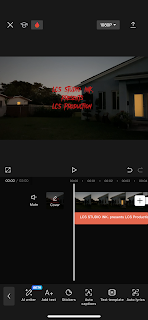
Hello. Welcome back. Wrapping up the filming. I went to “CapCut” and added each video in order of how the storyboard was. The scenes that came out the best i added to my favorites on my camera roll, so it would be easier to know which ones to add. When I added all the clips together I realized that it went over the time limit that was given. Which was fine because I just had to crop the clips that we filmed as extras just in case we didn’t reach the time frame limit. I went to each clip and split the parts that I didn’t need from the ones I wanted and deleted the unwanted clips. I got the total of minutes to 2:00, which was perfect for the opening sequence.I decided to work on the labels and names first before adding the music. I thought it’d be easier on me to just work on it first and get it out of the way. I clicked on the text icon at the bottom tool layout and selected “add text” I typed in the name of our production and studio. From there I clicked the “font” button and selected ...
Hello. Welcome back. Last time I left off on the editing. This time I finished up the rest of the editing. I realized I forgot to add the beginning scene of the main lead walking at the beach so I had to go back and add it. Not only that but before I could move on to adjusting the audio I had to crop some scenes because they went over the time limit that was given. For the scene where the lead was bumped into the sound had to be edited. This took a bit to fix, it was a long stressful process. What I had to do was split the audio in half where it matched up with the lyrics being heard from the scene. I had to move the audio more to the right to match up the lyrics. This was done by holding and dragging the sound. This created a problem for me because it left the beginning of the video without music. I cut the beginning of the song and made a copy so I could drag it to the beginning of the video. The intro ended up being more extended but that's ok, although trying to match the beats...

Comments
Post a Comment